
In this free lesson from the upcoming tutorial on Preview for Mac see how you can use Preview to fill out and export PDF forms. With PDF forms easy to completely fill out and sign a document without needing to create your own text boxes or print it out first!
Tag Archive for: Mac

In this quick lesson from TheMacU.com see how to use the Image Capture App that is built into every Mac to scan photos or documents. Learn more about system preferences, the Desktop and using your Mac overall with the macOS High Sierra Core Concepts Tutorial.
If you are not yet an All Access subscriber, begin your free trial by selecting one of the membership options below…
Monthly All Access Subscription
- Just $5 per month for TheMacU All Access. Fill out the form below to create your account then click the "Join All Access" button at the bottom of the page. On the next page enter your payment information to complete the registration and begin your free trial! *This is an auto-renewing subscription. No refunds after the free trial period and you must cancel prior to the renewal date to avoid being charged for the next year.
Yearly All Access Subscription
- Only $25 per year for TheMacU All Access. Fill out the form below to create your account then click the "Join All Access" button at the bottom of the page. On the next page enter your payment information to complete the registration and begin your free trial!
*This is an auto-renewing subscription. No refunds after the free trial period and you must cancel prior to the renewal date to avoid being charged for the next year.
Lifetime Membership
- With this option pay $150 once for an All Access Membership that will never expire! Fill out the form below to create your account then click the "Join All Access" button at the bottom of the page. On the next page enter your payment information to complete the registration and begin viewing all the tutorials!
One Year Membership
- With this option pay $30 once for an All Access Membership that is good for a full year. This membership will not auto-renew like the yearly subscription. Fill out the form below to create your account then click the "Join All Access" button at the bottom of the page.
Three Month Membership
- With this option pay $12 one time for a 3-Month All Access Membership. This membership will not auto-renew. Fill out the form below to create your account then click the "Join All Access" button at the bottom of the page.

In this free lesson from the upcoming tutorial on Preview for Mac see how you can use Preview to fill out and export PDF forms. With PDF forms easy to completely fill out and sign a document without needing to create your own text boxes or print it out first!
In this quick lesson from TheMacU.com see how to use the Image Capture App that is built into every Mac to scan photos or documents. Learn more about system preferences, the Desktop and using your Mac overall with the macOS High Sierra Core Concepts Tutorial.
If you are not yet an All Access subscriber, begin your free trial by selecting one of the membership options below…
Monthly All Access Subscription
- Just $5 per month for TheMacU All Access. Fill out the form below to create your account then click the "Join All Access" button at the bottom of the page. On the next page enter your payment information to complete the registration and begin your free trial! *This is an auto-renewing subscription. No refunds after the free trial period and you must cancel prior to the renewal date to avoid being charged for the next year.
Yearly All Access Subscription
- Only $25 per year for TheMacU All Access. Fill out the form below to create your account then click the "Join All Access" button at the bottom of the page. On the next page enter your payment information to complete the registration and begin your free trial!
*This is an auto-renewing subscription. No refunds after the free trial period and you must cancel prior to the renewal date to avoid being charged for the next year.
Lifetime Membership
- With this option pay $150 once for an All Access Membership that will never expire! Fill out the form below to create your account then click the "Join All Access" button at the bottom of the page. On the next page enter your payment information to complete the registration and begin viewing all the tutorials!
One Year Membership
- With this option pay $30 once for an All Access Membership that is good for a full year. This membership will not auto-renew like the yearly subscription. Fill out the form below to create your account then click the "Join All Access" button at the bottom of the page.
Three Month Membership
- With this option pay $12 one time for a 3-Month All Access Membership. This membership will not auto-renew. Fill out the form below to create your account then click the "Join All Access" button at the bottom of the page.
The all-new Pixelmator Pro Essentials Tutorial is now available! In this tutorial, we see how to use all the main features and tools in Pixelmator Pro. This tutorial will be helpful for anyone new to Pixelmator Pro whether you have used the original Pixelmator App before or not. Pixelmator Pro is not an update to the classic Pixelmator App, it is built from the ground up and brand new. It’s only been available for a few months but is already my “go to” image editor. The icon for the tutorial that you see above was created in Pixelmator Pro! Learn More…
Pixelmator Pro is available only from The Mac App Store Here…
Current All Access Members can view the full tutorial Here…
To view all of TheMacU Tutorials start your 7 day free trial as an All Access Member with any of the options below!
Monthly All Access Subscription
- Just $5 per month for TheMacU All Access. Fill out the form below to create your account then click the "Join All Access" button at the bottom of the page. On the next page enter your payment information to complete the registration and begin your free trial! *This is an auto-renewing subscription. No refunds after the free trial period and you must cancel prior to the renewal date to avoid being charged for the next year.
Yearly All Access Subscription
- Only $25 per year for TheMacU All Access. Fill out the form below to create your account then click the "Join All Access" button at the bottom of the page. On the next page enter your payment information to complete the registration and begin your free trial!
*This is an auto-renewing subscription. No refunds after the free trial period and you must cancel prior to the renewal date to avoid being charged for the next year.
Lifetime Membership
- With this option pay $150 once for an All Access Membership that will never expire! Fill out the form below to create your account then click the "Join All Access" button at the bottom of the page. On the next page enter your payment information to complete the registration and begin viewing all the tutorials!
One Year Membership
- With this option pay $30 once for an All Access Membership that is good for a full year. This membership will not auto-renew like the yearly subscription. Fill out the form below to create your account then click the "Join All Access" button at the bottom of the page.
Three Month Membership
- With this option pay $12 one time for a 3-Month All Access Membership. This membership will not auto-renew. Fill out the form below to create your account then click the "Join All Access" button at the bottom of the page.
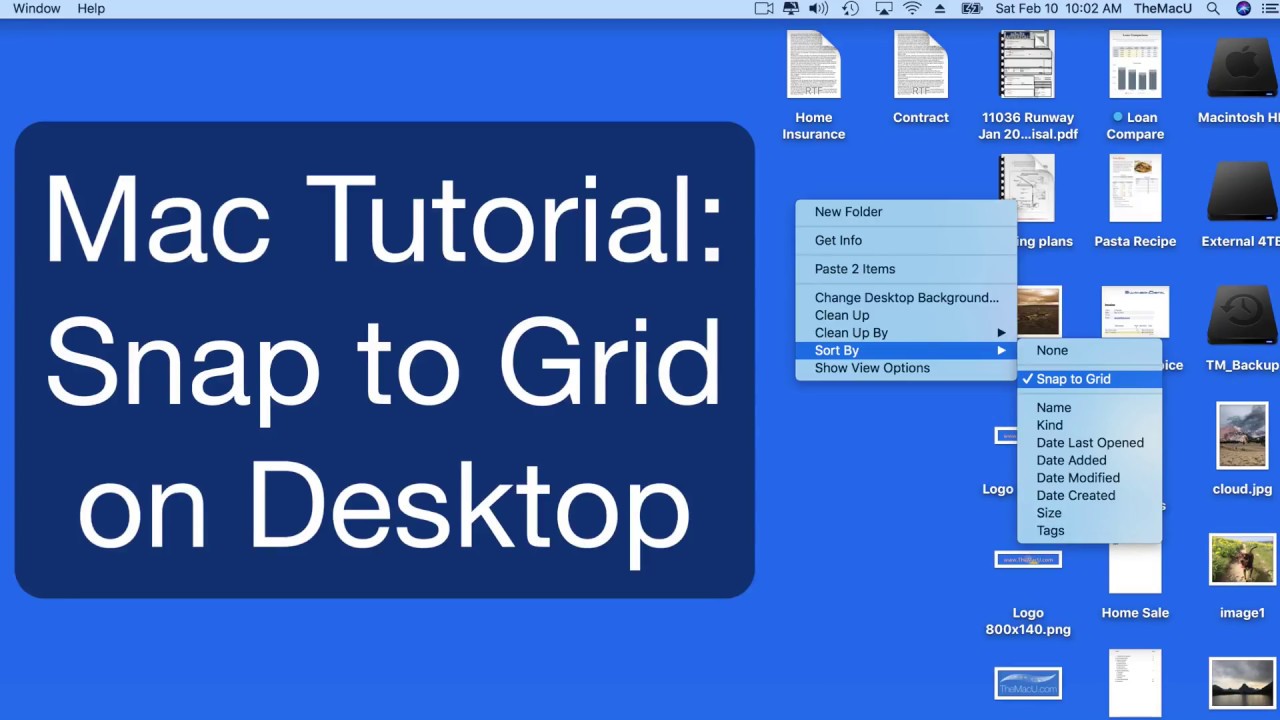
In this quick lesson from TheMacU.com see how to use the Snap to Grid view option to uncluttered your desktop but still have control over how it’s arranged! Learn more about the Desktop, Finder and your Mac overall with the macOS Core Concepts Tutorial.
If you are not yet an All Access subscriber, begin your free trial by selecting one of the membership options below…
Monthly All Access Subscription
- Just $5 per month for TheMacU All Access. Fill out the form below to create your account then click the "Join All Access" button at the bottom of the page. On the next page enter your payment information to complete the registration and begin your free trial! *This is an auto-renewing subscription. No refunds after the free trial period and you must cancel prior to the renewal date to avoid being charged for the next year.
Yearly All Access Subscription
- Only $25 per year for TheMacU All Access. Fill out the form below to create your account then click the "Join All Access" button at the bottom of the page. On the next page enter your payment information to complete the registration and begin your free trial!
*This is an auto-renewing subscription. No refunds after the free trial period and you must cancel prior to the renewal date to avoid being charged for the next year.
Lifetime Membership
- With this option pay $150 once for an All Access Membership that will never expire! Fill out the form below to create your account then click the "Join All Access" button at the bottom of the page. On the next page enter your payment information to complete the registration and begin viewing all the tutorials!
One Year Membership
- With this option pay $30 once for an All Access Membership that is good for a full year. This membership will not auto-renew like the yearly subscription. Fill out the form below to create your account then click the "Join All Access" button at the bottom of the page.
Three Month Membership
- With this option pay $12 one time for a 3-Month All Access Membership. This membership will not auto-renew. Fill out the form below to create your account then click the "Join All Access" button at the bottom of the page.
Keep your Mac running its best with CleanMyMac!

In this lesson from the upcoming Pixelmator Pro Essentials tutorial see how to use the new single window interface in Pixelmator Pro. Look for the full Pixelmator Pro Essentials Tutorial to be released before the end of February 2018.
Pixelmator Pro is available only on The Mac App Store for $59.99.
If you are not yet an All Access Member start your 7 day free trial with any of the membership options below!
Monthly All Access Subscription
- Just $5 per month for TheMacU All Access. Fill out the form below to create your account then click the "Join All Access" button at the bottom of the page. On the next page enter your payment information to complete the registration and begin your free trial! *This is an auto-renewing subscription. No refunds after the free trial period and you must cancel prior to the renewal date to avoid being charged for the next year.
Yearly All Access Subscription
- Only $25 per year for TheMacU All Access. Fill out the form below to create your account then click the "Join All Access" button at the bottom of the page. On the next page enter your payment information to complete the registration and begin your free trial!
*This is an auto-renewing subscription. No refunds after the free trial period and you must cancel prior to the renewal date to avoid being charged for the next year.
Lifetime Membership
- With this option pay $150 once for an All Access Membership that will never expire! Fill out the form below to create your account then click the "Join All Access" button at the bottom of the page. On the next page enter your payment information to complete the registration and begin viewing all the tutorials!
One Year Membership
- With this option pay $30 once for an All Access Membership that is good for a full year. This membership will not auto-renew like the yearly subscription. Fill out the form below to create your account then click the "Join All Access" button at the bottom of the page.
Three Month Membership
- With this option pay $12 one time for a 3-Month All Access Membership. This membership will not auto-renew. Fill out the form below to create your account then click the "Join All Access" button at the bottom of the page.

In this lesson from the full tutorial on iCloud from TheMacU.com see how to use iCloud.com to utilize iCloud Apps & services from any computer!
All Access Members can view the full tutorial here.
If you are not yet an All Access Member start your 7 day free trial with any of the membership options below!
Monthly All Access Subscription
- Just $5 per month for TheMacU All Access. Fill out the form below to create your account then click the "Join All Access" button at the bottom of the page. On the next page enter your payment information to complete the registration and begin your free trial! *This is an auto-renewing subscription. No refunds after the free trial period and you must cancel prior to the renewal date to avoid being charged for the next year.
Yearly All Access Subscription
- Only $25 per year for TheMacU All Access. Fill out the form below to create your account then click the "Join All Access" button at the bottom of the page. On the next page enter your payment information to complete the registration and begin your free trial!
*This is an auto-renewing subscription. No refunds after the free trial period and you must cancel prior to the renewal date to avoid being charged for the next year.
Lifetime Membership
- With this option pay $150 once for an All Access Membership that will never expire! Fill out the form below to create your account then click the "Join All Access" button at the bottom of the page. On the next page enter your payment information to complete the registration and begin viewing all the tutorials!
One Year Membership
- With this option pay $30 once for an All Access Membership that is good for a full year. This membership will not auto-renew like the yearly subscription. Fill out the form below to create your account then click the "Join All Access" button at the bottom of the page.
Three Month Membership
- With this option pay $12 one time for a 3-Month All Access Membership. This membership will not auto-renew. Fill out the form below to create your account then click the "Join All Access" button at the bottom of the page.

In this lesson from the Photos for Mac Edit & Share Tutorial see how to use the selective color adjustment tool. Current All Access subscribers can view the Photos for Mac View & Organize tutorial today here…
If you are not yet an All Access subscriber begin your free trial by selecting one of the membership options below…
Monthly All Access Subscription
- Just $5 per month for TheMacU All Access. Fill out the form below to create your account then click the "Join All Access" button at the bottom of the page. On the next page enter your payment information to complete the registration and begin your free trial! *This is an auto-renewing subscription. No refunds after the free trial period and you must cancel prior to the renewal date to avoid being charged for the next year.
Yearly All Access Subscription
- Only $25 per year for TheMacU All Access. Fill out the form below to create your account then click the "Join All Access" button at the bottom of the page. On the next page enter your payment information to complete the registration and begin your free trial!
*This is an auto-renewing subscription. No refunds after the free trial period and you must cancel prior to the renewal date to avoid being charged for the next year.
Lifetime Membership
- With this option pay $150 once for an All Access Membership that will never expire! Fill out the form below to create your account then click the "Join All Access" button at the bottom of the page. On the next page enter your payment information to complete the registration and begin viewing all the tutorials!
One Year Membership
- With this option pay $30 once for an All Access Membership that is good for a full year. This membership will not auto-renew like the yearly subscription. Fill out the form below to create your account then click the "Join All Access" button at the bottom of the page.
Three Month Membership
- With this option pay $12 one time for a 3-Month All Access Membership. This membership will not auto-renew. Fill out the form below to create your account then click the "Join All Access" button at the bottom of the page.
Keep your Mac running its best with CleanMyMac!

In this lesson see how to use the metadata labels feature in Photos for Mac. Activating these labels allow you to quickly see which photos have keywords applied, have been edited or have been marked as a favorite. Look for the full View & Organize Photos for Mac tutorial in mid November 2017!
If you are not yet an All Access subscriber begin your free trial by selecting one of the membership options below…
Monthly All Access Subscription
- Just $5 per month for TheMacU All Access. Fill out the form below to create your account then click the "Join All Access" button at the bottom of the page. On the next page enter your payment information to complete the registration and begin your free trial! *This is an auto-renewing subscription. No refunds after the free trial period and you must cancel prior to the renewal date to avoid being charged for the next year.
Yearly All Access Subscription
- Only $25 per year for TheMacU All Access. Fill out the form below to create your account then click the "Join All Access" button at the bottom of the page. On the next page enter your payment information to complete the registration and begin your free trial!
*This is an auto-renewing subscription. No refunds after the free trial period and you must cancel prior to the renewal date to avoid being charged for the next year.
Lifetime Membership
- With this option pay $150 once for an All Access Membership that will never expire! Fill out the form below to create your account then click the "Join All Access" button at the bottom of the page. On the next page enter your payment information to complete the registration and begin viewing all the tutorials!
One Year Membership
- With this option pay $30 once for an All Access Membership that is good for a full year. This membership will not auto-renew like the yearly subscription. Fill out the form below to create your account then click the "Join All Access" button at the bottom of the page.
Three Month Membership
- With this option pay $12 one time for a 3-Month All Access Membership. This membership will not auto-renew. Fill out the form below to create your account then click the "Join All Access" button at the bottom of the page.
Prepare your Mac for the upgrade to High Sierra and keep it running its best with CleanMyMac!

In this lesson just see how to use the Hide command to make an app disappear from your display without quitting or minimizing it. We also look at how to hide all visible Apps except the one you are actively using. Current All Access subscribers can view the full tutorial here…
If you are not yet an All Access subscriber begin your free trial by selecting one of the membership options below…
Monthly All Access Subscription
- Just $5 per month for TheMacU All Access. Fill out the form below to create your account then click the "Join All Access" button at the bottom of the page. On the next page enter your payment information to complete the registration and begin your free trial! *This is an auto-renewing subscription. No refunds after the free trial period and you must cancel prior to the renewal date to avoid being charged for the next year.
Yearly All Access Subscription
- Only $25 per year for TheMacU All Access. Fill out the form below to create your account then click the "Join All Access" button at the bottom of the page. On the next page enter your payment information to complete the registration and begin your free trial!
*This is an auto-renewing subscription. No refunds after the free trial period and you must cancel prior to the renewal date to avoid being charged for the next year.
Lifetime Membership
- With this option pay $150 once for an All Access Membership that will never expire! Fill out the form below to create your account then click the "Join All Access" button at the bottom of the page. On the next page enter your payment information to complete the registration and begin viewing all the tutorials!
One Year Membership
- With this option pay $30 once for an All Access Membership that is good for a full year. This membership will not auto-renew like the yearly subscription. Fill out the form below to create your account then click the "Join All Access" button at the bottom of the page.
Three Month Membership
- With this option pay $12 one time for a 3-Month All Access Membership. This membership will not auto-renew. Fill out the form below to create your account then click the "Join All Access" button at the bottom of the page.
Keep your Mac running it running its best with CleanMyMac!

In this quick lesson from TheMacU.com see how to use the Mail App in High Sierra with the new Split View feature in Full Screen. I use Mail all the time and this feature has made the App that much better. I now always have Mail in Full Screen and utilize Split View for replies and new messages.
Learn much more about macOS High Sierra in both the What’s New and Core Concepts Tutorials available now. We also have a full tutorial on Mail for Mac as well!
If you are not yet an All Access subscriber begin your free trial by selecting one of the membership options below…
Monthly All Access Subscription
- Just $5 per month for TheMacU All Access. Fill out the form below to create your account then click the "Join All Access" button at the bottom of the page. On the next page enter your payment information to complete the registration and begin your free trial! *This is an auto-renewing subscription. No refunds after the free trial period and you must cancel prior to the renewal date to avoid being charged for the next year.
Yearly All Access Subscription
- Only $25 per year for TheMacU All Access. Fill out the form below to create your account then click the "Join All Access" button at the bottom of the page. On the next page enter your payment information to complete the registration and begin your free trial!
*This is an auto-renewing subscription. No refunds after the free trial period and you must cancel prior to the renewal date to avoid being charged for the next year.
Lifetime Membership
- With this option pay $150 once for an All Access Membership that will never expire! Fill out the form below to create your account then click the "Join All Access" button at the bottom of the page. On the next page enter your payment information to complete the registration and begin viewing all the tutorials!
One Year Membership
- With this option pay $30 once for an All Access Membership that is good for a full year. This membership will not auto-renew like the yearly subscription. Fill out the form below to create your account then click the "Join All Access" button at the bottom of the page.
Three Month Membership
- With this option pay $12 one time for a 3-Month All Access Membership. This membership will not auto-renew. Fill out the form below to create your account then click the "Join All Access" button at the bottom of the page.
Prepare your Mac for the upgrade to High Sierra and keep it running its best with CleanMyMac!