• All Access Login
  • Contact
TheMacU.com
  • Home
  • Free Lessons
  • Full Tutorials
    • Core Tutorials
      • macOS 27 Golden Gate What’s New
      • macOS Core Concepts
      • iOS 27 What’s New
      • iOS Core Concepts
      • iPadOS Overview
      • iCloud for Mac, iPad & iPhone
      • Apple Intelligence
      • Mac Utilities
      • Mac Backup
      • Mac Security
      • CleanMyMac X
      • Markup for iOS
      • iOS 26 What’s New
      • iOS 18 What’s New
      • macOS 26 Tahoe What’s New
      • macOS Sequoia What’s New
    • Productivity Tutorials
      • Safari for Mac
      • Safari for iOS (iPad & iPhone)
      • Mail for Mac
      • Mail for iOS (iPad & iPhone)
      • Files for iOS
      • Contacts for Mac & iOS
      • Calendar for Mac & iOS
      • Reminders for Mac & iOS
      • Apple Maps for iOS & Mac
      • Notes for Mac & iOS
      • FindMy for iOS & Mac
      • Freeform for iOS & Mac
      • Health App Overview
      • Pages for Mac
      • Numbers for Mac
      • Keynote for Mac
      • Pages for iOS
    • Photography Tutorials
      • Photos for Mac
      • Photos for iPad
      • Photos for iPhone
      • iPhone Camera
      • iMovie for Mac
      • iMovie for iOS (iPad & iPhone)
      • Pixelmator Pro Essentials
      • Preview for Mac
    • Media & Entertainment Tutorials
      • Music App for Mac
      • Music App for iOS (iPhone & iPad)
      • Apple Music Service
      • AirPods Tutorial
      • Apple Podcasts
      • Apple News
      • Apple Books
  • Testimonials
  • Memberships & Pricing
  • Click to open the search input field Click to open the search input field Search
  • Menu Menu
Free iOS Lessons

How to Record a Phone Call on iPhone & Get a Transcript in Notes!

Free video lesson · iPhone & iPad

How to Record a Phone Call on iPhone & Get a Transcript in Notes!

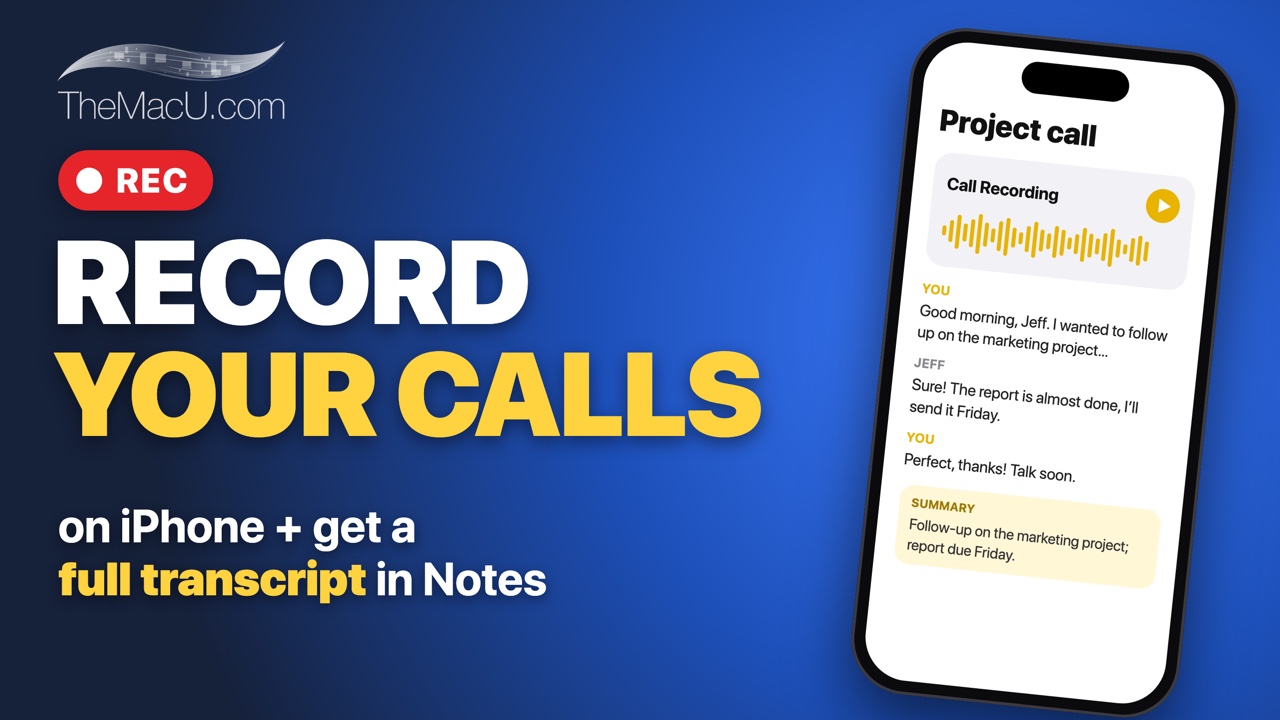
Record a phone or FaceTime call on iPhone and get a full transcript and summary saved to the Notes app. Free step-by-step video lesson from TheMacU.
Added November 23, 2026

Free video lesson
How to Record a Phone Call on iPhone & Get a Transcript in Notes!

In this lesson, see how to record a phone or FaceTime call right on your iPhone and get a full written transcript saved to the Notes app. When you hang up, Notes keeps the call audio, a transcript of everything that was said and a summary of the call, so you never lose the details of an important conversation.
What you’ll learn in this video...

  • Turn on call recording in the Phone settings
  • Start recording from the More button during a phone or FaceTime call (both people are notified)
  • Take your own notes in the Notes app while you’re still on the call
  • Read the full transcript, with what each person said shown separately
  • View a summary of the call from Apple Intelligence (on iPhones that support it)
  • Search the transcript for a specific word or phrase
  • Save or share the call audio as its own file

Keep learning

Notes for Mac & iOS 31 video lessons

Checklists, tables, folders, tags and Smart Folders, attachments and scans, Apple Pencil, locked notes and sharing.

Start your free trialSee the lessons

Advertisement

Keep learning

Notes for Mac & iOS

31 video lessons

  • Accounts & Sync
  • Add Notes & Folders
  • Format Text
  • Checklists
  • Tables
Start your free trialSee every lesson →
Advertisement

Keep watching

More free video lessons
Free lessonHow to use Tags & Smart folders in Apple Notes for Mac!Free lessonApple Notes App Lesson: Add Links between Notes!Free lessonHow to create or edit Notes with Siri on an iPhone or iPad!291 free lessonsBrowse every free Mac, iPhone and iPad lessonSee all free lessons →

All Access membership

Watch every Mac, iPhone and iPad tutorial on TheMacU

Every plan starts with a free trial. Cancel any time during the trial and you won't be charged.

Monthly

Auto recurring
$5/ month

5-day free trial

  • Every Mac, iPhone & iPad tutorial
  • New tutorials as they're released
  • Watch on any device
  • No ads
  • Email support
Start monthly trial
Best value

Yearly

Auto recurring
$30/ year

7-day free trial · just $2.50 a month

  • Every Mac, iPhone & iPad tutorial
  • New tutorials as they're released
  • Watch on any device
  • No ads
  • Email support
Start yearly trial

Lifetime

Single payment
$150one time

7-day free trial · pay once, keep it for good

  • Everything in Yearly
  • Every future macOS & iOS update tutorial
  • Never pay again
Start lifetime trial

Secure checkout. Log in on any Mac, iPhone or iPad with the same account.

Tips & guides

Step-by-step guides on this topic

How to Lock Notes on iPhone and Keep Them PrivateRead the guide →How to Scan Documents With iPhone NotesRead the guide →How to Organize Notes on iPhoneRead the guide →
November 23, 2026
Tags: iPhone, Notes, Phone
Share this entry
  • Share on Facebook
  • Share on X
  • Share on WhatsApp
  • Share on Pinterest
  • Share on LinkedIn
  • Share on Tumblr
  • Share on Reddit
  • Share by Mail
http://themacu.com/wp-content/uploads/2017/06/TMU.com-Header-logo-jpg-300x138.jpg 0 0 Drew http://themacu.com/wp-content/uploads/2017/06/TMU.com-Header-logo-jpg-300x138.jpg Drew2026-11-23 18:46:362026-11-23 18:46:36How to Record a Phone Call on iPhone & Get a Transcript in Notes!
You might also like
iOS Video Tutorial - Learn iPhone & iPad! How to use Dynamic Island on iPhone!
Markup for iOS Tutorial... Markup for iOS Tutorial…
iPhone 11 Camera Tutorial is Now Available! iPhone 11 Camera Tutorial is Now Available!
Contacts Calendars Reminders iOS Tutorial2019 TheMacU.com New Lessons for the Calendar & Reminders Apps for iPhone & iPad!
How to use Setapp to access 240+ Mac & iOS Apps! How to use Setapp to access 240+ Mac & iOS Apps!
Mac Backup Tutorial Free Lesson – Setup a 3 Tier Mac Backup System to keep your files safe!
iOS 11 Sneak Peak - Long Exposure effect for Live Photos! iOS 11 Sneak Peak – Long Exposure effect for Live Photos!
AirPods Tutorial Now Available! AirPods Tutorial Now Available!

All Access

View our comprehensive collection of Mac, iPad, and iPhone tutorials today! We offer a range of membership options, all starting with a free trial!

Start your Free Trial!

Search Topics

Search Search

Topics

Apple Intelligence Apple Maps Apple Music camera desktop Finder High Sierra iCloud iMac iMovie iOS iOS 11 iOS 12 iOS 13 iOS 14 iOS 15 iPad iPadOS iPad Pro iPhone iPhone 11 iPhone 12 iPhone X Luminar Mac Macbook Macbook Air MacBook Pro Mac Mini macOS macOS Catalina Mail Maps Mojave Music Notes Photo Editing Photo Enhancement Photos Safari Settings Sierra tips troubleshooting tutorial

Archive

Free Lessons!

  • Record your calls on iPhone and get a full transcript in Notes
    How to Record a Phone Call on iPhone & Get a Transcript in Notes!November 23, 2026 - 6:46 pm
  • How to Use Backblaze Online Backup for Mac!
    How to Use Backblaze Online Backup for Mac!November 6, 2026 - 8:56 pm
  • How to Erase, Format & Choose the Best File System on Mac (APFS, ExFAT, & More)
    How to Erase, Format & Choose the Best File System on Mac (APFS, ExFAT, & More)October 29, 2026 - 4:17 pm
  • How to use Tags & Smart folders in Apple Notes for Mac!
    How to use Tags & Smart folders in Apple Notes for Mac!October 16, 2026 - 5:12 pm
  • How to use Spotlight in macOS - App Launcher + File Search + Shortcuts + Clipboard History!
    How to use Spotlight in macOS – App Launcher + File Search + Shortcuts + Clipboard History!October 5, 2026 - 8:25 pm
  • How to Use the NEW "Describe a Shortcut" automation Feature in macOS 27 Golden Gate (Siri AI)
    How to Use the NEW “Describe a Shortcut” automation Feature in macOS 27 Golden Gate (Siri AI)September 21, 2026 - 11:54 pm
  • How to Use the NEW Siri AI App in iOS 27!
    How to Use the NEW Siri AI App in iOS 27!September 19, 2026 - 5:44 pm
  • How to Use macOS 27 Visual Intelligence: Siri On-Screen AI Explained!
    How to Use macOS 27 Visual Intelligence: Siri On-Screen AI Explained!September 14, 2026 - 9:03 pm
  • Notify Me - New Safari Browser feature in macOS 27! (Track Price Drops & Restocks!)
    Notify Me – New Safari Browser feature in macOS 27! (Track Price Drops & Restocks!)September 9, 2026 - 10:01 pm
  • Use Contacts with other Apps - Apple Contacts for iPhone & iPad Tutorial
    Use Contacts with other Apps – Apple Contacts for iPhone & iPad TutorialJuly 13, 2026 - 9:00 pm
  • How to Set Up Emergency Contacts & Medical ID on iPhone
    How to Set Up Emergency Contacts & Medical ID on iPhone!May 25, 2026 - 4:03 pm
  • Apple Maps for Mac: Master Places, Pinned Locations & Custom Guides! Step by Step Tutorial.
    Apple Maps for Mac: Master Places, Pinned Locations & Custom Guides! Step by Step Tutorial.May 10, 2026 - 4:40 pm
  • Safari Profiles on iPhone & iPad — Keep Work & Personal Browsing Completely Separate!
    Safari Profiles on iPhone & iPad — Keep Work & Personal Browsing Completely Separate!May 2, 2026 - 4:33 pm
  • How to Use the Info Panel in Apple Photos for Mac: View, Edit & Organize Your Photo Details
    How to Use the Info Panel in Apple Photos for Mac: View, Edit & Organize Your Photo DetailsApril 19, 2026 - 5:21 pm
  • Remove photos from your Main Library when they are in an Album! Apple Photos Lesson for Mac & iOS!
    Remove photos from your Main Library when they are in an Album! Apple Photos Lesson for Mac & iOS!April 11, 2026 - 5:28 pm

All Access

  • Tutorials Browser
  • Account

Browse

  • All Tutorials
  • Core Tutorials
  • Productivity Tutorials
  • Photography Tutorials

Blog

  • Free Apple Watch Lessons! (4)
  • Free iOS Lessons (151)
  • Free Mac Lessons (167)
  • Mac, iPhone and iPad Tips! (102)
  • News (106)
  • Recommended Items (3)
  • Uncategorized (75)
  • Updates (100)

About & Info

  • Contact
  • Promo Offer Terms
  • Partners & Affiliates
  • Group Memberships
SwansonDigital, LLC Ltd. All Rights Reserved. TheMacU.com has not been sponsored, or otherwise approved by Apple Inc. - Enfold WordPress Theme by Kriesi
  • Link to Facebook
Link to: iPhone Battery Draining Fast? How to Fix It Link to: iPhone Battery Draining Fast? How to Fix It iPhone Battery Draining Fast? How to Fix ItiPhone Battery settings showing a low battery and battery usage by app
Scroll to top Scroll to top Scroll to top
20%OFF

TheMacU newsletter

Get 20% off any membership

Join our weekly newsletter for free lessons, new tutorials and member deals. We’ll send your 20% code right away.

One email a week. Unsubscribe anytime.

You’re subscribed

Here’s your code

Use it for 20% off any All Access membership. It applies every time your membership renews. We’ve emailed it to you too.

See membership options